> For the complete documentation index, see [llms.txt](https://docs.scrt.network/secret-network-documentation/llms.txt). Markdown versions of documentation pages are available by appending `.md` to page URLs; this page is available as [Markdown](https://docs.scrt.network/secret-network-documentation/infrastructure/infrastructure-services/pccs-server.md).
# PCCS Server
Installing and running a PCCS server
The Provisioning Certificate Caching Service (PCCS) is a critical infrastructure component that enables DCAP-based SGX attestation for Secret Network nodes. PCCS acts as a local caching layer between your SGX-enabled hardware and Intel's Provisioning Certificate Service, storing and serving attestation collateral including Platform Certification Keys (PCK certificates), Certificate Revocation Lists (CRLs), TCB information, and enclave identity data.
PCCS server is developed and maintained by Intel.
For Secret Network validators and node operators, running a PCCS ensures reliable quote generation and verification without depending on real-time access to Intel's remote services—essential for maintaining network uptime and enabling the trusted execution environment that powers Secret Network's confidential smart contracts.
### How to install
#### Register with Intel Trusted Services
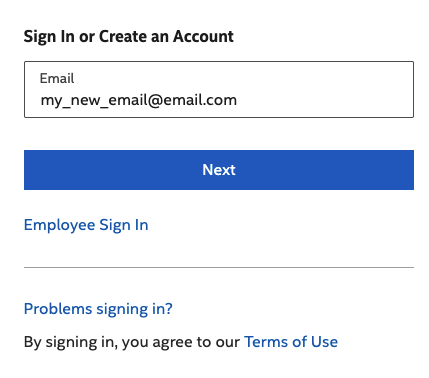
1. Visit
2. Click "Sign In" (even if you don't have an account)
3. Enter your email.
4. If the email is not known, the registration will start
#### Obtain an API key
Once logged in to Trusted Services, click "[Intel® SGX and Intel® TDX Registration Service](https://api.portal.trustedservices.intel.com/registration)"
\
or just go to this URL:
Once on the Registration Service page, click "Subscribe":
After you confirm your subscription on the following page, you should be taken to the Subscription page. Click "show" next to the primary key and copy it to a secure location:
#### Install PCCS Package
1. Add the official Intel Debian repository to your system sources and import the signing key:
```
curl -fsSL https://download.01.org/intel-sgx/sgx_repo/ubuntu/intel-sgx-deb.key | \
sudo apt-key add - . /etc/os-release; VERSION_CODENAME=${VERSION_CODENAME}
sudo add-apt-repository "deb https://download.01.org/intel-sgx/sgx_repo/ubuntu \
$VERSION_CODENAME main"
sudo apt-get update
```
2. Install the PCCS Package
```
sudo apt install sgx-dcap-pccs
```
During the installation you will be prompted for: PCCS API Key: Enter the key you obtained from in the previous step.
PCCS Listening Port: Default is typically 8081. PCCS Administrator
Password: Set a password for administrative tasks.
3. Verify installation:
```
sudo systemctl status pccs
```
4. PCCS server should be up and running now. Secret Nodes operators can set the URL of the PCCS server their `/etc/sgx_default_qcnl.conf` configuration file
---
# Agent Instructions
This documentation is published with GitBook. GitBook is the documentation platform designed so that both humans and AI agents can read, navigate, and reason over technical content effectively. Learn more at gitbook.com.
## Querying This Documentation
If you need additional information that is not directly available in this page, you can query the documentation dynamically by asking a question.
Perform an HTTP GET request on the current page URL with the `ask` query parameter, and the optional `goal` query parameter:
```
GET https://docs.scrt.network/secret-network-documentation/infrastructure/infrastructure-services/pccs-server.md?ask=&goal=
```
`ask` is the immediate question: it should be specific, self-contained, and written in natural language.
`goal` is optional and describes the broader end goal you are ultimately trying to accomplish on behalf of the user. GitBook uses it to tailor the answer towards what is most useful for that goal.
The response will contain a direct answer to the question and relevant excerpts and sources from the documentation.
Use this mechanism when the answer is not explicitly present in the current page, you need clarification or additional context, or you want to retrieve related documentation sections.